Create an OData Source for a same-system service
Use this procedure when the OData service, for example, an SAP Gateway service or an RAP-based OData service, runs on the same ABAP system as Neptune DXP - SAP Edition. In this scenario no proxy is needed, because the application server calls the service directly without crossing a domain boundary.
For remote services on a different system, see Connect to a remote system via HTTP Destination instead.
Prerequisites
-
You know the relative URL path of the target OData service, for example,
/sap/opu/odata/sap/<my_service>/.If you do not know the path, you can look it up using the value help after completing the setup steps below. See Browse and select an OData service using value help.
Procedure
-
In Cockpit, go to Connectivity → OData Source.
-
Select Create.
-
Enter a unique name for the OData Source and select Create OData Source.
The name is how the source is identified in the App Designer. Choose something that makes the target service and system recognizable (for example,
S4_PURCHASE_ORDERS_V2). -
In the General section, enter an optional Description and Package assignment.
-
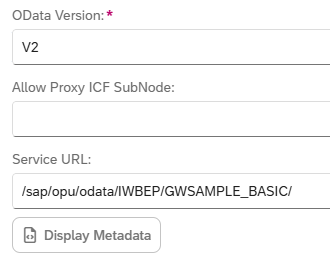
In the Connection section, set OData Version to match the target service: V2 or V4.
-
Leave Enable Proxy unselected.
-
In the Service URL field, either:
-
Enter the relative service path directly (for example,
/sap/opu/odata/sap/<my_service>/), or -
Use the value help icon to browse the system’s OData catalog and select a service. See Browse and select an OData service using value help.
-
-
Select Save.
-
Select Display Metadata to verify the connection by retrieving the service metadata document.
Result
-
The OData Source is saved and available for use in the App Designer. The metadata display confirms the service is reachable and correctly configured.
OData Sources are not transported via TMS transports. Use Deployment → Export and Deployment → Import in the Cockpit to move OData Sources between system landscapes.