Browse and select an OData service using value help
The value help on the Service URL field queries the OData catalog of the target system and presents matching services for selection. This is an alternative to entering a service URL manually and is useful when you do not know the exact service path or want to confirm that a service exists and is accessible.
Prerequisites
-
The value help is only available once the destination is fully defined. Ensure one of the following conditions is met before proceeding:
-
Same-system (no proxy): the Enable Proxy checkbox is disabled. See Create an OData Source for a same-system service.
-
Remote system (proxy with HTTP Destination): Enable Proxy is active, Authentication Type is set to HTTP Destination, and an HTTP Destination has been selected. See Connect to a remote system via HTTP Destination.
-
-
The OData Version field must also be set before opening the value help, as the catalog query is filtered by protocol version.
Procedure
-
In the OData Source configuration dialog, select the value help icon next to the Service URL field.

Result: The catalog service of the target system is queried. The first ten matching OData services for the selected version are listed.
If no OData V4 services are displayed in the value help, the service group /IWFND/CONFIGmay not yet be published. For information about publishing and managing OData V4 service groups, see OData V4 Service Catalog. -
To narrow the results, type a search term in the search field, for example, a service name, technical ID, or keyword such as
businesspartner.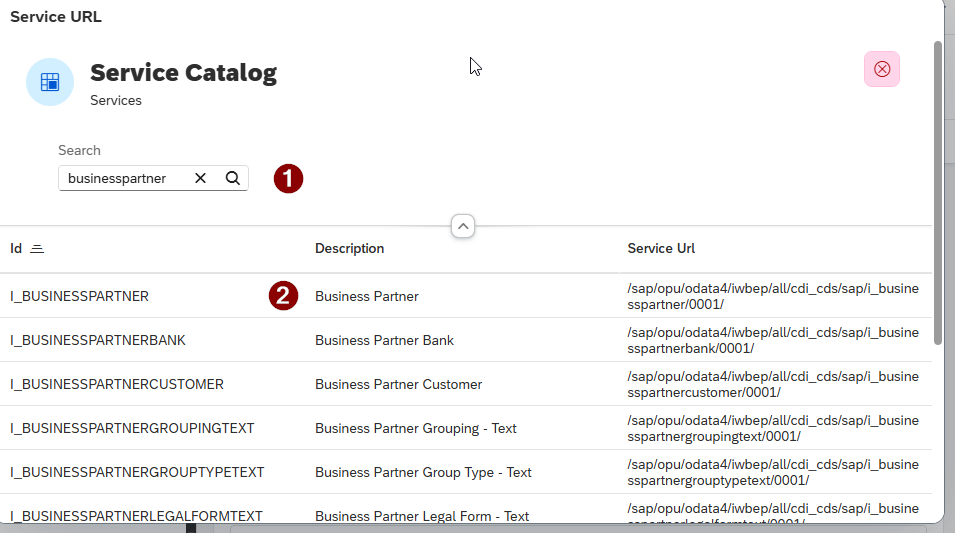
Result: Services with a matching ID or description are returned.
-
Choose a service entry by selecting one.
Result: The service path is written into the Service URL field automatically.
-
Select Save.
-
Select Display Metadata to confirm the service is reachable and the metadata document loads correctly.

The catalog query is version-specific. If you change OData Version after selecting a service (for example, switching from V2 to V4), use the value help again to select a service from the correct catalog.
Result
-
The Service URL field is populated with the selected service path. The metadata display confirms that the service is accessible with the current configuration.