Migration lookup reference
This page is the lookup reference for the Neptune DXP App Migration Wizard. It covers the migration pipeline summary, engineer action detail, analysis report categories, DDIC label fetch behavior, diagnostics file contents, generated output files, and support scope guidance. It is linked from the step-by-step guide and concept overview at the relevant points.
Migration pipeline summary
The following describes what the migration engine transforms automatically. All transformations are applied where the corresponding elements are present in the source app.
App structure and content
| Element | How it is handled |
|---|---|
UI5 controls and component tree |
Fully migrated; all standard |
Object properties and attributes |
Migrated; non-empty values only, matching Neptune DXP - Open Edition convention |
Script and TypeScript resources |
Inlined into the Neptune DXP - Open Edition object model |
HTML fragments |
Inlined into the Neptune DXP - Open Edition object model |
Event scripts (Anonymous Function) |
Fully migrated; handlers behave identically in OE |
App-level stylesheet (CSS) |
Mapped to Neptune DXP - Open Edition |
App manifest |
Mapped to Neptune DXP - Open Edition |
UI5 control type resolution |
Resolved from object data, live library tree, or built-in fallback map; the Analyze step flags any controls where resolution cannot be completed automatically |
Translations
| Element | How it is handled |
|---|---|
Classic app translations / i18n |
SAP single-character language codes converted to BCP-47 locale strings and inlined per attribute |
SAP data dictionary field label translations |
For DDIC-bound technical fields (e.g. |
Back-end connectivity
| Element | How it is handled |
|---|---|
Ajax ID logic |
Rewritten as TypeScript; calls routed through the Neptune DXP - Open Edition proxy to the SAP back end. Review generated code post-migration if backend paths or authentication parameters differ between environments. |
OData model bindings |
Recreated to route through the Neptune DXP - Open Edition proxy; validate against the SAP back end post-migration |
REST API bindings |
Runtime wrappers generated so REST-bound controls continue to work; validate connectivity post-migration |
Mock server data |
Neptune DXP - SAP Edition MockServer setups converted to the Neptune DXP - Open Edition equivalent |
Neptune DXP - Open Edition metadata defaults
Neptune DXP - Open Edition-specific fields that do not exist in Neptune DXP - SAP Edition are set on first save. These reflect current Neptune DXP - Open Edition best practices and are appropriate for the vast majority of migrated apps. They can be adjusted in the app settings if your deployment has specific requirements.
| Neptune DXP - Open Edition field | Default | Purpose |
|---|---|---|
|
|
ES compilation target (modern) |
|
|
Modern Neptune DXP - Open Edition app handler |
|
|
Enables server-side file storage for the app; disabled by default as Neptune DXP - SAP Edition apps do not use this feature |
|
|
Enables the app-level manifest; set automatically if the source app includes manifest content |
|
|
Enables the app-level stylesheet; set automatically if the source app includes CSS content |
|
|
Controls whether the app is accessible without authentication; disabled by default to preserve authenticated access |
|
|
Authorization roles — assign as needed post-migration |
|
Assigned by OE on save |
Managed by Neptune DXP - Open Edition runtime |
Engineer action reference
SAP-specific elements and analysis report categories
The Analyze step flags elements that require engineer decisions. The table below covers both the report categories an engineer will encounter and the recommended action for each.
| Element / report category | What it means | Recommended action |
|---|---|---|
Information |
Non-blocking notes, e.g. Ajax IDs present in scripts |
Review post-migration; Ajax logic is restructured automatically into TypeScript |
SAPUI5 controls ( |
Controls unavailable in OpenUI5; flagged in the Analyze report |
Replaced with safe placeholders during migration so the app continues to load. Plan manual replacement with Neptune DXP - Open Edition-compatible equivalents. |
Value Help controls |
No direct Neptune DXP - Open Edition mapping; flagged in the Analyze report |
Manual replacement required post-migration |
API Factory controls |
Flagged in the Analyze report |
Manual replacement required post-migration |
REST API objects |
Neptune DXP - SAP Edition-proprietary REST API node types |
Runtime wrappers generated automatically; validate connectivity against the SAP back end post-migration |
OData sources |
References to ABAP OData services |
Bindings recreated to route through the Neptune DXP - Open Edition proxy; validate against the SAP back end post-migration |
Cross-app dependencies ( |
Other Neptune DXP - SAP Edition apps referenced in scripts |
The report lists each referenced app ID. Verify that each exists in Neptune DXP - Open Edition, or plan to migrate it, before testing navigation flows |
Custom Components ( |
App type requiring handling beyond the wizard’s current scope |
Additional manual steps required. Consult the |
Errors |
Blocking issues preventing migration |
Review the error detail in the report. Each error is described with its cause and must be resolved before the Migrate step can proceed. |
Elements configured in Neptune DXP - Open Edition
The following areas are most effectively established using Neptune DXP - Open Edition’s native tooling after migration. They are a normal part of the post-migration development workflow:
-
UI5 JSON model definitions: configure in the Neptune DXP - Open Edition App Designer
-
Table column definitions: configure in the Neptune DXP - Open Edition App Designer
-
Global app settings: configure in the Neptune DXP - Open Edition app settings
-
New-style i18n attributes and content: configure in the Neptune DXP - Open Edition App Designer
-
Plugin and theme data: configure in the Neptune DXP - Open Edition App Designer
-
Authorization roles: empty by default on the migrated app; assign appropriate Neptune DXP - Open Edition roles
-
Header script: re-enter in the Neptune DXP - Open Edition app settings if present in the source app
-
Data bindings: re-configure in Neptune DXP - Open Edition if the source app used Neptune DXP - SAP Edition-specific data bindings
DDIC label fetch behaviour
When DDIC-bound technical field bindings are present in the source app, identified by
the ~ prefix (e.g. ~MATNR) or (sapddic>_) patterns, the wizard can fetch
human-readable label translations directly from the SAP data dictionary at migration
time.
| Binding pattern | Fetch mechanism | Requirement | ||
|---|---|---|---|---|
|
API Factory |
The SAP system must have the required API Factory class available and configured with an appropriate policy. For more information, see Policy.
|
||
|
App’s |
Files must be present in the source app |
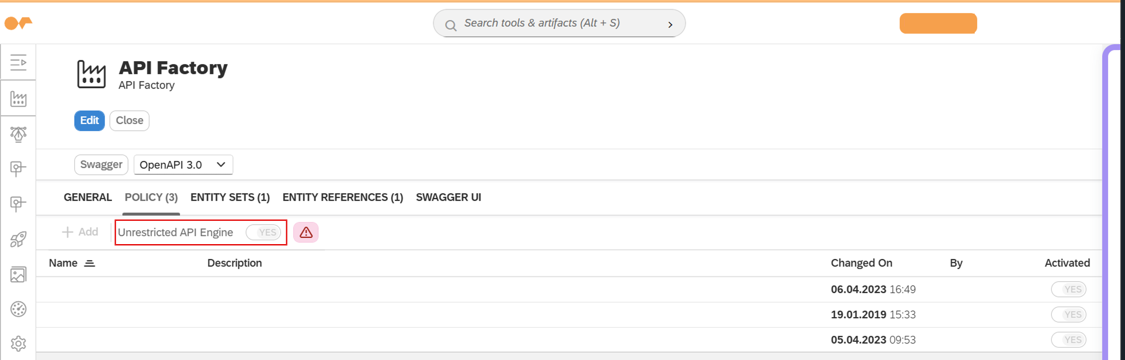
Fetched translations are written into the migrated app as RefDataElements_* keys.
Failed fetches are non-blocking. The migration continues without the affected
translations. Fetch errors are reported in the diagnostics file under
pipeline.refDataElementErrors.
If a ~ binding fetch fails, verify that the SAP user running the migration has
the /NEPTUNE/CL_DR_LIB_DDIC_DTEL_X API Factory in their policy before
re-running the analysis.
Diagnostics file reference
The diagnostics file is a JSON snapshot of the full migration analysis, available for download after the Analyze step has run and also on failure during the Migrate step. It is the primary artefact to attach when raising a support ticket.
Contents
| Field | Contents |
|---|---|
|
Bridge package name, version, and wizard identifier |
|
Wizard runtime mode and non-credential configuration. Passwords, usernames, and base URLs that may carry tokens are stripped before the file is written. |
|
Neptune DXP - SAP Edition app metadata: application ID ( |
|
Verified Neptune DXP - SAP Edition system information: name, description, and DXP version |
|
Quick totals: objects, warnings, dependencies, external references, and Neptune DXP - SAP Edition-specific objects |
|
Full warnings output — identical to what is shown in the analysis report |
|
Full cross-app dependency output — identical to what is shown in the analysis report |
|
Full external references output — identical to what is shown in the analysis report |
|
Neptune DXP - SAP Edition Send/Receive binding details for cross-page model wiring |
|
Binding snapshots for each model object |
|
The complete raw Neptune DXP - SAP Edition source app as received by the bridge, allowing Neptune Support to reproduce the mapping offline |
|
The complete mapped Neptune DXP - Open Edition app output including all generated migration code |
|
Post-processing results: Neptune DXP - Open Edition-safe filter exclusions, structural transforms, generic model rewrite details, ref-data-element transform entries, Ajax/OData/REST/MockServer migration counts, and any non-fatal ref-data-element fetch errors |
Migration output files reference
After a successful migration, the following files are generated under the Resources tree in the Neptune DXP - Open Edition App Designer:
Resources/
└── __GENERATED_MIGRATION_CODE__/
    ├── README                        ← migration summary
    └── __AJAX_ID_MIGRATION__/
        └── (generated .ts files, one per Ajax ID group)
README
The README is both human- and machine-readable. It provides a structured summary
of the full migration pipeline output for the specific app:
-
Elements transformed automatically
-
Elements excluded or replaced with placeholders, and the reason for each
-
Elements that require manual review or rework
-
Elements with no Neptune DXP - Open Edition equivalent, with guidance on how to approach them
Consult the README before making manual changes or using Naia Build to continue
development. It provides the migration-specific baseline for all subsequent work.
Ajax ID TypeScript files
Each generated .ts file under AJAX_ID_MIGRATION wraps one group of Ajax
ID calls as TypeScript functions routed through the Neptune DXP - Open Edition
proxy to the SAP back end. Service paths and SAP system parameters are preserved
from the source app.
In most cases no changes are needed if the remote system is correctly configured in Neptune DXP - Open Edition. Changes are required when:
-
Back-end service paths differ between the Neptune DXP - SAP Edition and Neptune DXP - Open Edition environments
-
Authentication parameters have changed
-
Service structures have been modified on the SAP back end
Support scope and self-service guidance
Work through the checklist below before raising a support ticket. Most post-migration issues are the result of expected manual rework or environment-specific configuration rather than migration defects.
Self-service checklist
1. Consult the README. The GENERATED_MIGRATION_CODE / README lists every
element that requires review or manual rework specific to your migration. If a
control, binding, or service is not behaving as expected, verify whether it is
documented there before escalating.
2. Review the Analyze report. If an element was flagged during analysis, its post-migration behavior is expected — the report described the required action. Hard-coded Ajax calls, unmapped OData services, and SAPUI5 control placeholders are expected outputs for apps containing those elements, not migration defects.
3. Verify remote system configuration. Generated Ajax TypeScript, OData bindings, and REST wrappers all route through the Neptune DXP - Open Edition remote system proxy. If back-end calls are not resolving, confirm that the remote system is correctly configured in Neptune DXP - Open Edition, the SAP back end is reachable, and service paths have not changed between environments.
4. Check API Factory policy permissions. If DDIC field label translations are
missing, verify that the SAP user has the /NEPTUNE/CL_DR_LIB_DDIC_DTEL_X API Factory
in their policy. Failed fetches are non-blocking and are reported in the diagnostics
file under pipeline.refDataElementErrors, not as visible errors in the wizard.
5. Validate in the Neptune DXP - Open Edition runtime. Some binding and connectivity issues are only visible at runtime. Test the migrated app end-to-end against your SAP back end before concluding that a migration error has occurred.
What constitutes a support case
Raise a support ticket if:
-
The wizard produces an error during the Analyze or Migrate step that is not described in the analysis report or
README. -
The migrated app structure is materially incomplete in a way not accounted for by the Analyze report, for example, objects or scripts present in the Neptune DXP - SAP Edition source app are missing from the migrated app and are not flagged as unsupported.
-
A generated migration output (Ajax TypeScript, OData binding, REST wrapper) produces incorrect or unexpected behavior after remote system configuration has been verified.
-
The wizard fails to connect to a correctly configured remote system.
When raising a ticket, attach the diagnostics file downloaded from the Analyze step. It contains the full source app, mapped output, pipeline results, and system metadata required for Neptune Support to reproduce and investigate the issue offline. Do not substitute screenshots of the analysis report for the diagnostics file. The JSON contains detail not visible in the UI.
What falls outside support scope
The following are expected outcomes of the migration process and are not support cases:
-
SAPUI5 controls replaced with placeholders: these require manual replacement with Neptune DXP - Open Edition-compatible equivalents as documented in the Analyze report.
-
Ajax, OData, or REST connections that require reconfiguration because service paths, authentication, or system topology differ between the Neptune DXP - SAP Edition and Neptune DXP - Open Edition environments.
-
Elements listed under Engineer action reference that are configured directly in Neptune DXP - Open Edition as part of normal post-migration development.
-
Naia Build output that requires manual adjustment for larger apps — expected behavior related to app complexity, as described in the step-by-step guide.
-
App behavior that differs from Neptune DXP - SAP Edition due to differences between SAPUI5 and OpenUI5, or between SAP back-end services and Neptune DXP - Open Edition-proxied equivalents.