Activate Naia Build access to Claude API in Neptune DXP Portal
Aim: Configure the Bring Your Own Key (BYOK) Claude model API key in the Neptune DXP Portal, establish cost limits at account (personal account or organization account) and user level, and accept the BYOK terms, so that you or users in your organization can access Naia Build with Claude model capabilities from within App Designer.
Prerequisites
-
You are running a Neptune DXP - Open Edition instance from version 24.12 MTS or above, or a Neptune DXP - SAP Edition instance on version 24.x or above.
-
You have (administrator) credentials for the Neptune DXP Portal.
-
You have obtained a valid Claude API key from Anthropic before proceeding (get one at Claude Console).
Neptune acts as a proxy for requests but does not own or manage this key. You are (in the case of a personal account) or your organization is (in the case of an organization account) solely responsible for the key, its security, and all associated usage costs. Use the key only within the Neptune DXP Portal. Do not share it or reuse it in other systems. -
In the case of organization usage, a decision on per-user and total monthly spend caps.
Procedure
Activate Claude API key for a personal account
Activate the Claude API key for the system associated with your personal account.
-
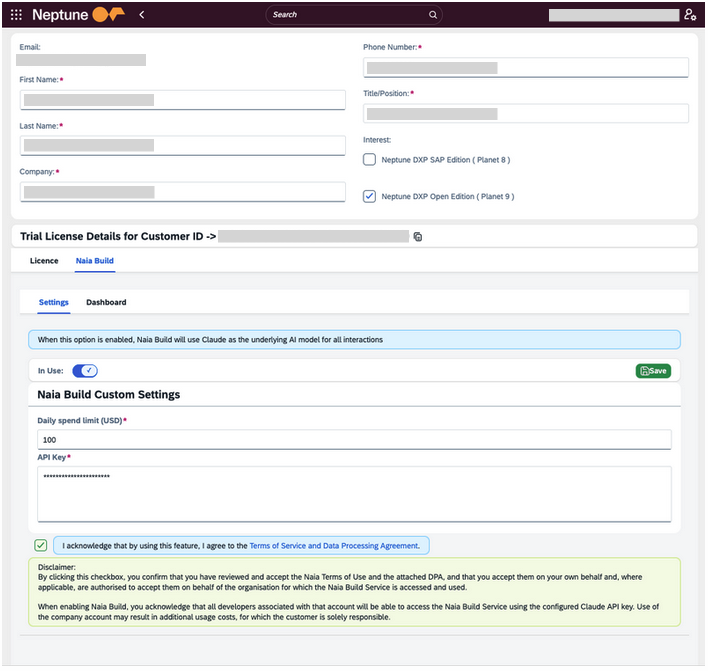
Go to Neptune DXP Portal → Your Account → Naia Build.
-
Toggle the In Use switch to on.
Result: This activates Naia Build for your account and makes the remaining configuration fields available.
-
Set daily spend limits for the account when consuming tokens for agents powered using the Claude API by entering a value in Daily spend limit (USD).
-
In API Key, paste your Anthropic Claude API key. This key is stored at the account level in the Neptune DXP Portal and is used when Naia Build is active. Neptune does not have visibility into your Anthropic billing account. Cost tracking within the platform is handled separately via the Naia Build Dashboard. The key is stored in Azure Key Vault, not in Neptune application tables. After you save it, only the Naia Build server can read it, and only while you are signed in. Neptune does not log or transmit it elsewhere.
-
Accept the Bring Your Own Key (BYOK) terms by selecting the checkbox confirming: I acknowledge that by using this feature, I agree to the Terms of Service and Data Processing Agreement.
By selecting this, you acknowledge that any users associated with the account will have access to Naia Build via the configured API key, and that you/your organization is solely responsible for any resulting usage costs.
-
Select Save.
Result: Naia Build with Claude model support via the Claude API key is now active for your personal account.
Activate Claude API key for an organization account
Activate the Claude API key for the system associated with your organization account. These instructions are for organizations that want to add Claude as a premium model option, using their own Anthropic API key.
-
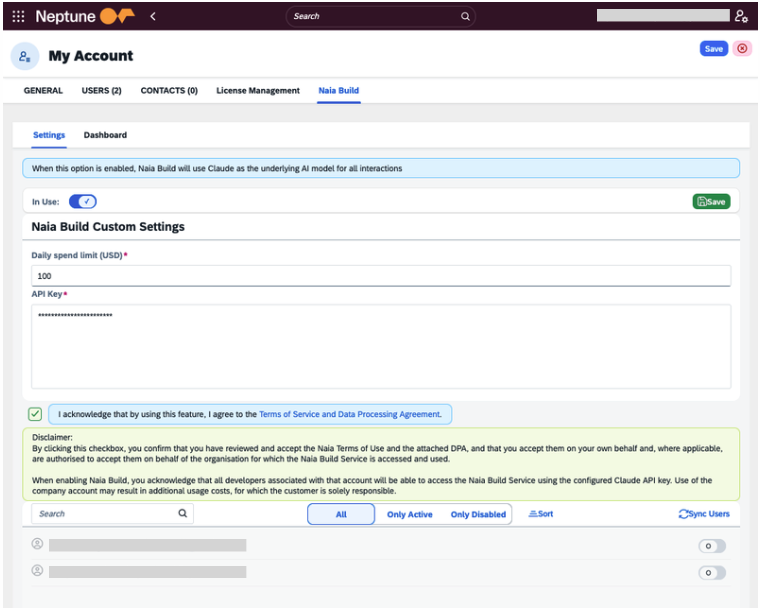
Go to Neptune DXP Portal Account Assignment → Naia Build.
-
Toggle the In Use switch to on.
Result: This activates Naia Build for your account and makes the remaining configuration fields available. Developers see the option in Naia Build immediately. No restart or developer-side configuration is required.
-
Set daily spend limits for the account when consuming tokens for agents powered using the Claude API by entering a value in Daily spend limit (USD). Define a per-user cap (typical range: $50–$200/month) and a per-account total cap. Both enforce in real time.
-
In API Key, paste your Anthropic Claude API key. This key is stored at the account level in the Neptune DXP Portal and is used when Naia Build is active. Neptune does not have visibility into your Anthropic billing account. Cost tracking within the platform is handled separately via the Naia Build Dashboard. The key is stored in Azure Key Vault, not in Neptune application tables. After you save it, only the Naia Build server can read it, and only while you are signed in. Neptune does not log or transmit it elsewhere.
-
Accept the Bring Your Own Key (BYOK) terms by selecting the checkbox confirming: I acknowledge that by using this feature, I agree to the Terms of Service and Data Processing Agreement.
By selecting this, you acknowledge that any users associated with the account will have access to Naia Build via the configured API key, and that your organization is solely responsible for any resulting usage costs. Your acceptance applies on behalf of every developer using the key on your account.
-
Select Save.
Result: Users within the system associated with your organization account display in the dialog.
-
Enable specific users to have access to the Claude model via the Claude API key by turning on the switch. If no users display, select Sync Users.
Result: Naia Build with Claude model support via the Claude API key is now active for your organization account.
Assign multiple keys for team-based access
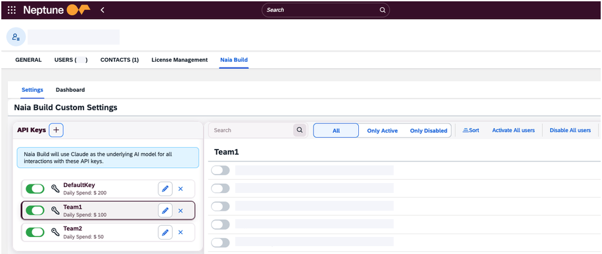
An organization account can hold more than one Claude API key. Assign a separate key to each team so that every team works with its own key rather than one shared across the organization. This gives granular access, clean cost attribution, and per-team ownership of the connection.
-
In the Neptune DXP Portal Naia Build configuration for the organization account, add each team key alongside any existing key.
-
Set a daily spend limit for each key.
-
Enable the relevant users for each key.
Result: Each enabled user draws on the key assigned to their team, and consumption is tracked per key in the Naia Build Dashboard.
Monitoring usage via Naia Build Dashboard
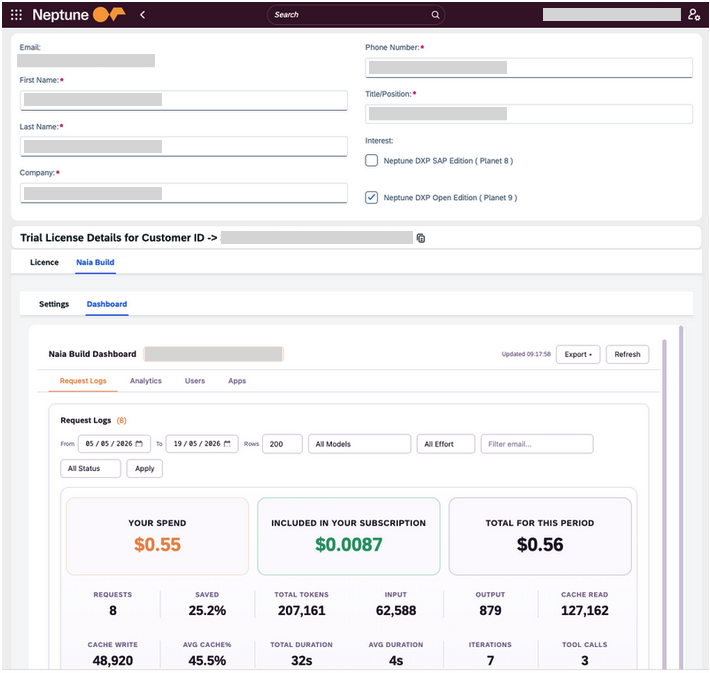
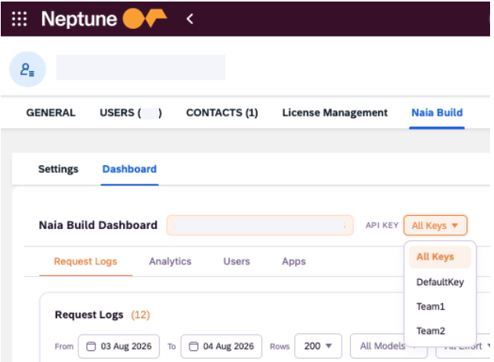
Once Naia Build is in active use, go to Naia Build Dashboard to monitor consumption. The dashboard provides the following views:
- Request Logs
-
Per-request detail including total cost, token breakdown (input, output, cache read, cache write), average cache percentage, duration, iterations, and tool calls, filterable by timeframe.
- Analytics
-
The same metrics as Request Logs presented graphically, with a Claude-specific section, a provider comparison view, and a breakdown by top users.
- Users
-
All developers on the account actively using the API key, with per-user request totals, cost, average cache percentage, average duration, and last active timestamp.
- Apps
-
Usage attributed to specific applications built with Naia Build, showing requests, cost, tokens, duration, and last active per application.
When an account holds multiple keys, the Request Logs, Analytics, and Users views break down consumption per key.
Result
-
You have configured the Claude API key and cost limits in Neptune DXP Portal to enable the Claude AI model for Naia Build either for a personal account or an organization account.
-
Users associated with the respective account can open the Naia Build workspace in the App Designer and select the Claude model from the Chat tab to begin building.