Neptune DXP - SAP Edition 24.15.0 release notes
June 24, 2026
App Designer
Deprecated styleClassPadding attributes
The following styleClassPadding attributes was added in previous DXP versions, but the UI5 framework has no support for the styleClassPadding CSS classes:
-
sap.f.AvatarGroup
-
sap.f.GridList
-
sap.m.Carousel
-
sap.m.List
-
sap.m.NotificationList
-
sap.m.Table
-
sap.f.ProductSwitch
-
sap.ui.layout.BlockLayoutCell
Deprecated UI5 Controls #709
The newly added support for all UI5 aggregation types in the App Designer has led to the deprecation of the following UI5 controls:
-
neptune.BarContent
-
neptune.CarouselPage
-
neptune.CSSGridItem
-
neptune.DialogButtons
-
neptune.DynamicPageTitleContent
-
neptune.DynamicSideContentArea
-
neptune.FixFlexContent
-
neptune.FlexibleColumnLayoutContent
-
neptune.GenericTileActionButtons
-
neptune.GraphLegend
-
neptune.GridContent
-
neptune.GridContainerItem
-
neptune.IllustratedMessageButtons
-
neptune.NodeActionLink
-
neptune.NotificationListButtons
-
neptune.ObjectPageDynamicHeaderTitleContent
-
neptune.ObjectPageSubSectionContent
-
neptune.PageHeaderContent
-
neptune.PDFView
-
neptune.PlanningCalendarToolbarContent
-
neptune.SidePanelItemContent
-
neptune.SidePanelMainContent
-
neptune.TableSettingFilterItem
-
neptune.TableSettingGroup
-
neptune.TableSettingSort
-
neptune.UploadSetHeaderField
Duplicate App Designer object shortcut #322
The shortcut Ctrl+D / CMD+D can now be used to duplicate an object in the App Designer.
Hide future controls
UI5 controls added in newer UI5 versions are now hidden by default in the App Designer, if the used UI5 version does not support them.
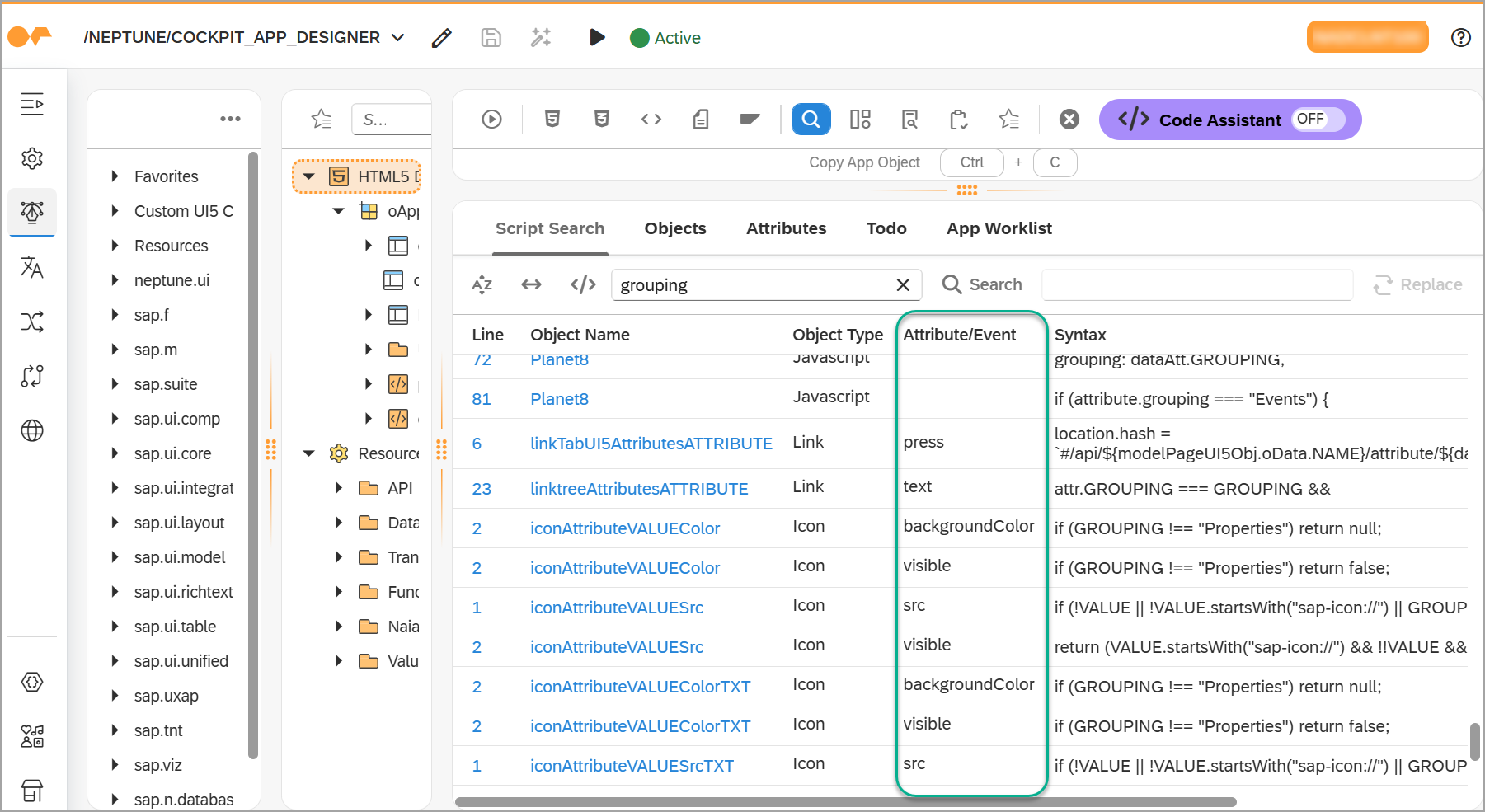
Improved script search for event code #730
When there are multiple hits in different events for the same object, this is now reflected in the result list of Script search in the App Designer. Additionally, there is a new column Attribute/Event that shows in which event or attribute the hit is located.
Keyboard shortcuts respect display mode #812
Keyboard action shortcuts are now correctly disabled when the application is in display mode, preventing unintended interactions.
Message area list display #779
Messages in the neptune.MessageArea are now aligned to the left and displayed
in a list format with wrapping, making them easier to read and distinguish.
New UI5 controls
The following new UI5 controls are now available:
-
sap.m.ActionTile
-
sap.m.ActionTileContent
-
sap.m.ColorPalette
-
sap.m.ColorPalettePopover
-
sap.m.MenuItemGroup
-
sap.m.PlanningCalendarLegend
-
sap.m.QuickViewCard
-
sap.m.ViewSettingsCustomItem
-
sap.m.ViewSettingsCustomTab
-
sap.m.ViewSettingsItem
-
sap.m.WheelSlider
-
sap.m.WheelSliderContainer
-
sap.m.plugins.UploadSetwithTable
-
sap.m.upload.UploadItem
-
sap.m.upload.ActionsPlaceholder
-
sap.m.upload.FilePreviewDialog
-
sap.m.upload.UploaderTableItem
-
sap.m.upload.UploadItemConfiguration
-
sap.ui.core.SeparatorItem
-
sap.ui.core.VariantLayoutData
-
sap.suite.ui.microchart.InteractiveBarChart
-
sap.suite.ui.microchart.InteractiveBarChartBar
-
sap.suite.ui.microchart.InteractiveDonutChart
-
sap.suite.ui.microchart.InteractiveDonutChartSegment
-
sap.suite.ui.microchart.InteractiveLineChart
-
sap.suite.ui.microchart.InteractiveLineChartPoint
-
sap.suite.ui.microchart.LineMicroChart
-
sap.suite.ui.microchart.LineMicroChartLine
-
sap.suite.ui.microchart.LineMicroChartPoint
-
sap.suite.ui.microchart.LineMicroChartEmphasizedPoint
-
sap.f.FlexibleColumnLayoutData
-
sap.f.FlexibleColumnLayoutDataForDesktop
-
sap.f.FlexibleColumnLayoutDataForTablet
-
sap.ui.layout.BlockLayoutCellData
-
sap.ui.layout.ResponsiveFlowLayoutData
-
sap.ui.layout.form.ColumnContainerData
-
sap.ui.layout.form.ColumnElementData
-
sap.ui.layout.form.GridContainerData
-
sap.ui.layout.form.GridElementData
-
sap.ui.layout.form.ResponsiveGridLayout
-
sap.ui.layout.form.ColumnLayout
-
sap.ui.layout.form.GridLayout
-
sap.ui.layout.form.ResponsiveLayout
-
sap.f.semantic.AddAction
-
sap.f.semantic.CloseAction
-
sap.f.semantic.CopyAction
-
sap.f.semantic.DeleteAction
-
sap.f.semantic.DiscussInJamAction
-
sap.f.semantic.EditAction
-
sap.f.semantic.ExitFullScreenAction
-
sap.f.semantic.FavoriteAction
-
sap.f.semantic.FlagAction
-
sap.f.semantic.FullScreenAction
-
sap.f.semantic.FooterMainAction
-
sap.f.semantic.MessagesIndicator
-
sap.f.semantic.NegativeAction
-
sap.f.semantic.PositiveAction
-
sap.f.semantic.PrintAction
-
sap.f.semantic.SendEmailAction
-
sap.f.semantic.ShareInJamAction
-
sap.f.semantic.SemanticPage
-
sap.f.semantic.SendMessageAction
-
sap.f.semantic.TitleMainAction
Pseudo attributes
Several UI5 controls were missing the tooltip, styleClass, styleClassMargin,
styleClassVisibility and enableCompactMode pseudo attributes. These have now
been added: styleClass, styleClassMargin, styleClassVisibility and enableCompactMode
to all controls that support the addStyleClass method, and tooltip to all
controls that support the setTooltip method.
Renamed UI5 controls
The PlanningCalendarAppointment in the sap.m library has been renamed to its real
name CalendarAppointment and moved to the correct sap.ui.unified library.
Show/hide deprecated UI5 controls #708
Deprecated UI5 controls are now hidden by default in the App Designer. You can enable the option to show deprecated controls in the Library pane settings.
Support for all UI5 aggregation and association types in all UI5 controls #673
The App Designer now supports all UI5 aggregation and association types in all UI5 controls. This means that you can use all default UI5 aggregations and associations without limitations in the App Designer. The inline UI5 documentation has been updated to reflect this change and provide guidance on how to use aggregations and associations.
Cockpit apps
Font loading
External icon fonts like Font Awesome are now required earlier, making the icon fonts available to all UI5 controls.
General
Added UTF-8 support to internal base64 utility #744
The internal utility methods to encode and decode base64 now properly support UTF-8.
Anonymous Access #852
Unlicensed anonymous access attempts are now correctly blocked, returning a 403 Forbidden response to prevent unauthorized entry into the platform. Instances where the license permits Anonymous Access remain unaffected.
Integration Hub API Designer
Design/Layout
List and detail page heights now handled properly to utilize available horizontal space and avoid overflowing.
Creation dialog
The Create API dialog displays any errors inline, instead of closing and using toasts
Transport dialog
Transport selection dialog adjusted to always refresh on opening and staying open during the whole save/delete flow. Also, transport selection for cloud flavor systems require manual step outlined in the transport selection dialog.
Launchpad
AppCache.Load load=init & parentObject combination #722
The AppCache.Load load=init & parentObject combination is now supported in the
Launchpad. An initial call that does not load the child app into the parent container.
The onInit event handler is triggered.
neptune.Shell.attachInit((data) => {
    AppCache.Load("YOUR_APP", {
        load: "init",
        parentObject: syncContainer,
    });
});
When the parent app is ready to load the child app, the following code can be used.
The onInit event handler is not triggered again. Only the onBeforeDisplay
event handler is triggered.
AppCache.Load("YOUR_APP", {
    parentObject: syncContainer,
});
Launchpad Most-Used feature DUMPS #849
A type mismatch that could cause runtime errors (DUMPS) in the Launchpad’s Most-Used feature, triggered once an app’s usage count reached a certain threshold, was resolved. The Launchpad now handles high-usage scenarios reliably without interruption. Related to #605.
Mobile Client
Cross-platform plugin for biometric authentication #535
The biometric plugins for iOS (cordova-plugin-ios-faceid) and Android (cordova-plugin-android-fingerprint-auth)
were replaced with the cross-platform plugin cordova-plugin-fingerprint-aio.
This plugin is more actively maintained and allows for a more consistent and
reliable biometric authentication experience across both platforms.
Okta authentication with Okta MFA code options #848
When using Okta as authentication provider, the user could not use the Okta MFA code options (SMS, Voice call, Okta Verify code) for the second-factor authentication. Before this bugfix, the only working MFA option was push with Okta Verify. Now, the user can use all Okta MFA code options for the second-factor authentication.
OData Source
Call App Designer #765
From the Where-Used list, you can directly call the App Designer with the selected app.
Display metadata document from OData Source #716
In the OData Source tool, a button to display the metadata document was implemented.
Value help on OData source URL #735
If Proxy is disabled, or you are using HTTP Destinations via SM59, in the URL field, you can now use the value help to call the system’s OData catalog service and pick an OData service from there.
Neptune DXP - Open Edition integration
Resolved issue in Neptune DXP - Open Edition Launchpad with SAP applications using objects named Image #828
Loading Neptune DXP- SAP Edition applications that contain an object with the name
Image in a Neptune DXP - Open Edition Launchpad led to a Javascript error. The
application could not be opened in that case.