Uninstall Neptune DXP - SAP Edition
Preparations before uninstallation
Before uninstalling Neptune DXP, please back up all your resources if you are planning to install Neptune DXP at a later point in time. What to back up depends on your usage of the platform, and here is a brief guide on how to perform the backup: - To export all custom Neptune DXP artifacts, the program /NEPTUNE/BACKUP can be used to create a transport with a backup of all the artifacts.
Alternatively, for manual selection, please follow this approach: - Export custom and extended or modified apps from the App Designer. Open the App in display mode in the App Designer and select “Export”. - Ensure you have transports with Rest APIs that have been developed in the Rest API Designer. Create any missing transports. - Export launchpad and mobile client configurations with corresponding resources etc: In the Neptune Cockpit start "Deployment" - "Export".
Pre-requisites
ICF Subnodes
Custom created icf subnodes below the neptune icf node, must be manually deleted. This applies to the nodes "public" and "server", and any other custom icf subnodes that has been created. Also external aliases that are pointing to the "neptune" node or its subnodes should be deleted.
Background jobs
In transaction SM37, delete the job “NEPTUNE_LOCK_HANDLER” if this has been created. First change the status to “Scheduled”. Then the background job can be deleted.
Uninstallation process
There are two ways to uninstall Neptune DXP - SAP Edition. One is via SAP transaction SAINT, and the other is via a dedicated uninstallation transport.
The installed versions in the system determine which uninstallation method that can be used.
-
Only transports have been used to install Neptune UXP - SAP Edition (version 5.0 and higher). Then the uninstallation transport must be used.
-
Neptune UXP - SAP Edition version 4.x or lower has been installed in the system. Then the uninstallation via SAINT must be used. If the Neptune has been upgraded to version 5.0 or higher, the uninstallation via SAINT must still be used. In this scenario, an uninstallation transport must be imported first, and then transaction SAINT must be used to finalize the uninstallation.
Depending on your situation, please follow the appropriate uninstallation method below:
-
Download Neptune DXP - SAP Edition Uninstallation transport from Neptune DXP Portal Please follow the instructions in the uninstallation guide in the zip to import the transport.
-
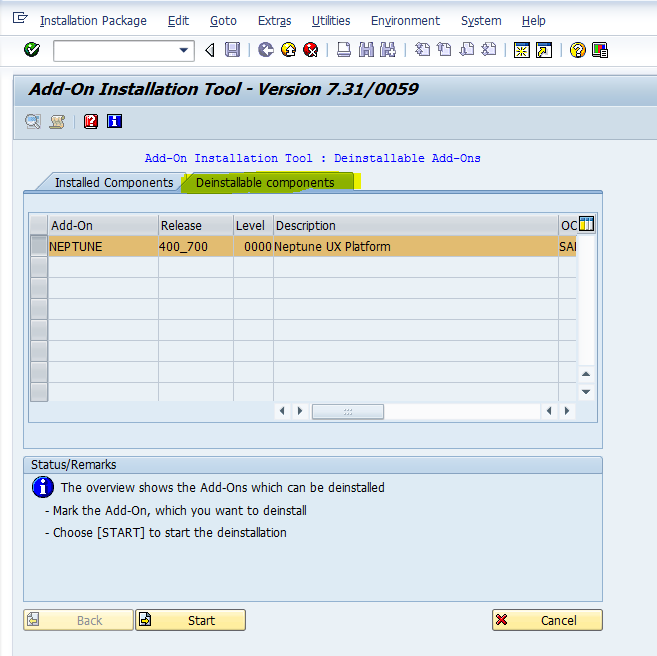
Via transaction SAINT go to tab Uninstallable Components, select the Neptune Add-On and click start to uninstall.