Define the interface
This task declares the data the candidate-review process flow works with. The interface is the data contract of the process flow. Once you declare an input, it appears on every node’s Inputs panel, ready to drag onto a node. For the concept, see How data moves through a process flow.
Prerequisites
-
You have created the process flow.
Procedure
-
Open the process flow, and go to the Interface tab.
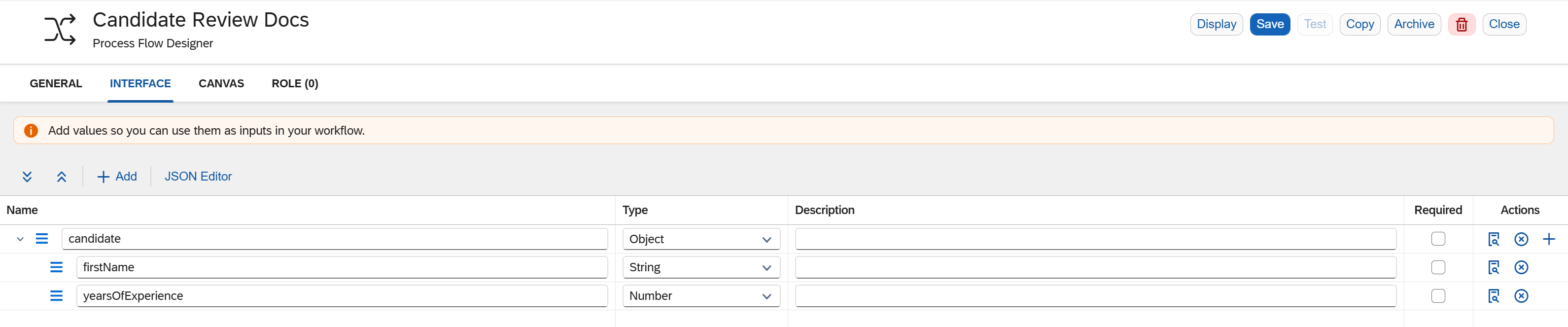
-
Select + Add to add an input.
-
Enter a name for the input, for example
candidate, and select its type.A property name must not be empty, and must not contain a /or a space. Use camelCase or another known variable format to minimize errors. The interface can map data from APIs and JSON, where property names are lenient, so these rules are deliberately minimal. -
Optional: to add a restriction, such as a maximum length, select the properties icon and set the restriction.
-
Repeat to add the inputs the process flow works with, such as the candidate’s name and years of experience.
-
Optional: to enter the whole interface as text, use the JSON editor on the Interface tab.
-
Select Save.
|
You can share the interface with anyone who triggers the process flow from a script or an app, so they know what data to provide. See Trigger a process flow from an app or a script. |
Results
-
The process flow declares its inputs.
-
Each input appears on the Inputs panel of every node, ready to drag onto a node in place of typing a binding by hand. See Binding syntax reference.