Adaptive tab template
The adaptive tab template allows you to group multiple adaptive framework applications or applications under a single template, organized into tabs. It provides a simple way to display different datasets, processes, or app views in one consolidated interface.
Add tabs and content
-
In the Tabs section, select Add to create a new tab.
-
Open Settings for the tab to configure:
- Title
-
The tab label.
- Icon
-
Select an icon from the available library.
- Show Count
-
Optionally display a record count next to the title.
- Content Type
-
Select either an adaptive framework application or another application.
- Content
-
Select the app to open in the tab.
Horizontal and vertical tabs
By default, tabs are displayed horizontally.
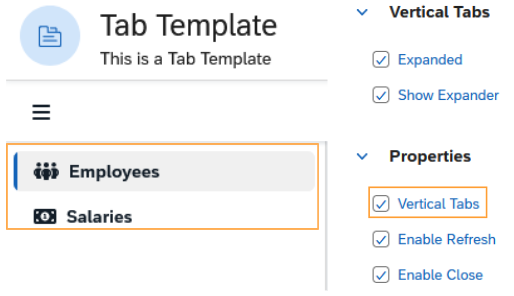
To switch to vertical tabs, select Vertical Tabs in Settings.
- Vertical Tabs
-
Aligns the tabs in a side panel.
- Expanded
-
Shows vertical tabs expanded by default.
- Show Expander
-
Displays a button above the tab list to expand or collapse.