Bind an attribute translation to a component property
Procedure
-
In the App Designer, in edit mode, go to the Designer.
-
In the Application tree, select the component object to which to apply attribute translations. For example, a sidebar home button component object:
sap.tnt.NavigationList(name:oSideNavigation) →sap.tnt.NavigationListItem(name:oNavigationListItem1).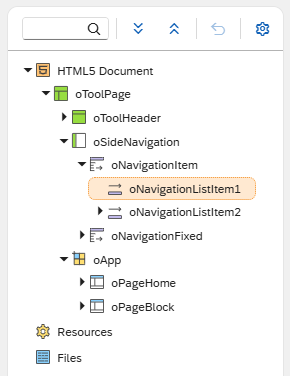
-
In the Component properties pane, select a component property (for example,
text, for the text to be displayed for the component property item) and select the Show Script icon.Result: The Binding dialog opens.
-
From the list, select the local or global i18n model that contains the translated attributes, and select Bind.
Result: The field of the component property
textfills with the selected binding (instead of a monolingual, static free-text entry, for example). -
In the shell bar, save your changes and activate the application.
-
You can verify if the binding applies successfully by going to Application Settings → Properties tab → Language and changing the language to one of the locales into which you want the sidebar home button text translated, for example, Polish. In the Designer, run the application from the shell bar.
Results
-
You have bound an attribute translation to a component property.
-
The sidebar home button text is translated according the selected application language settings.
Next steps
-
If required, you can deploy artifacts of the local or global i18n model to another (remote) system using the standard deployment procedure.