Cockpit tool overview
Watch and learn about key component tools of the Cockpit for Neptune DXP - Open Edition.
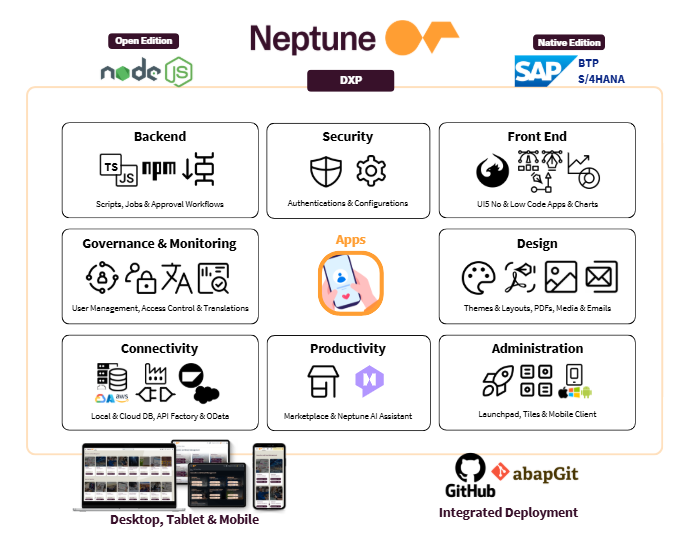
The following diagram displays a topic-based overview of the component tool capabilities of Neptune DXP - Open Edition.
Additional information
API Designer
With the API Designer you create and configure API definitions. You can also import External APIs.
You can use the Table Definition to create APIs from a local table.
The App Designer can integrate APIs from the API Designer with no-code data binding.
Table Definition
Use Table Definition to create APIs from a local table.
You can also use Table Definition to create server-side scripts with the Script Editor.
App Designer
With App Designer, you create low-code applications.
Learn more about the App Designer interface.
Server scripts (Script Editor)
With Script Editor, you create server-side scripts that run in their own separate process on the server.
App Designer consumes server scripts via API.
Workflow designer (Workflow Engine)
With Workflow Engine, you design, build, run, and manage workflows. Workflows define a sequential order of tasks that are performed by server scripts or users.
Workflow Engine uses server scripts from the Script Editor. You can trigger workflows in applications.
Tile
A Tile is a container that represents an application. All applications have at least one corresponding Tile.
Tiles are displayed in Tile Groups and on the Launchpad.
Tile Group
Tile Groups organize Tiles based on user roles. You can assign user roles and Tiles to a Tile Group.
Launchpad
Launchpad is the entry point to applications and displays a home page with Tiles and Tile Groups.
Each Tile represents an application that the user can launch.
Users access Launchpad from a desktop computer or a Mobile Client. Launchpad is role-based and display tiles according to the role of the user.